
Poker bankroll tracker app
Poker bankroll tracker: know what every session made
POKERHERO is a free poker bankroll tracker app. Log each cash game and tournament with buy-in, bullets, cash-out and hours, and it works out total profit, ROI, hourly rate and ITM% for you. No sign-up; data stays on your device by default.


- No sign-up to start logging
- Form, paste text or Voice Assistant
- Syncs across iPhone, Android and web
What you log
What can a poker bankroll tracker app record?
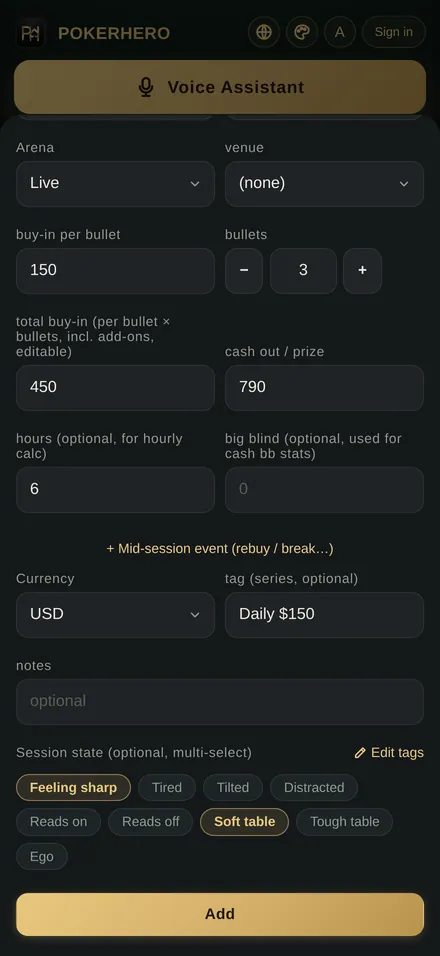
One record is one session: the date, the game type, where you played, what you bought in for, what you cashed out and how long you played. POKERHERO puts these on one form, and the more optional fields you fill in, the more stats it can work out.
Cash games and tournaments
Choose from 5 game types, including cash game, timed table, MTT and SNG, and mark each session live or online. The tracker can show only cash games or only tournaments, and the session list can be filtered by live or online play.
Buy-ins and bullets
For tournaments and timed tables, enter the buy-in per bullet and the number of bullets, from 1 to 100, and the total buy-in fills itself in. Rebuys during a session go under mid-session events and do not count as extra bullets.
Venues and sites
A venue drop-down lists card rooms across Taiwan, grouped into 4 regions, plus common online sites. If the place you play is not on the list, type its name in once and it appears under My venues next time.
Profit and hourly rate
Cash-out minus buy-in is the session's profit. Add hours to get an hourly rate, and add the big blind on cash games to see bb/hr and an estimated bb/100.
13 currencies
Log each session in its own currency: US dollars, Taiwan dollars, yen, won, Hong Kong dollars and more, 13 in all. Stats convert everything to the display currency you choose, using rates updated daily.
Session states and notes
There are 9 default session-state tags, such as Feeling sharp, Tired, Tilted, Reads on, Soft table and Ego, and you can add your own, delete them and change their order. Each session also takes a series tag and a free-text note.
| Field | What to enter | Used for |
|---|---|---|
| Date, type | Today by default; cash game, timed table, MTT, SNG and more | Period filters, cash vs. tournament stats |
| Arena, venue | Live or online; pick a venue or type one | "Most profitable venue" insight, arena filter |
| Buy-in, bullets | Cash: total buy-in incl. rebuys and add-ons; tournaments: per bullet × bullets | Profit, ROI, ITM per bullet |
| Cash-out / prize | Chips at the end or the prize; 0 if you missed the money | Profit, ITM% |
| Hours, big blind | Optional; hours give hourly rate, the big blind gives bb stats | Hourly, bb/hr, bb/100 |
| Currency, tag, note | Each session's own currency; a series tag such as Friday regular | Conversion, tag analysis |
| Session state | Pick any number; you edit the tag list | Behavior analysis: profit by state |
Three ways to log
What is the fastest way to log a session?
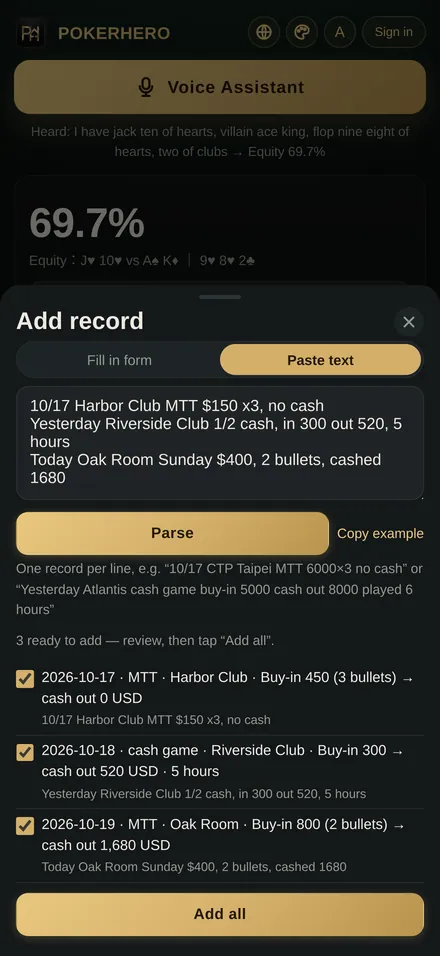
POKERHERO gives you 3 ways to log: tap the + at the table and fill in the form, paste your notes in one block when you get home, or tap the Voice Assistant button at the top of the tracker and say it. All 3 land in the same records and count toward the same stats.
- FormTap the + to open a new session. The date defaults to today; fill in type, buy-in and cash-out and you can save, since everything else is optional.
- Paste textSwitch the new session sheet to Paste text and enter one session per line, up to 20 lines at once, for example "Yesterday cash game in 300 out 520, 5 hours". Tap Parse, check each line, then add them all.
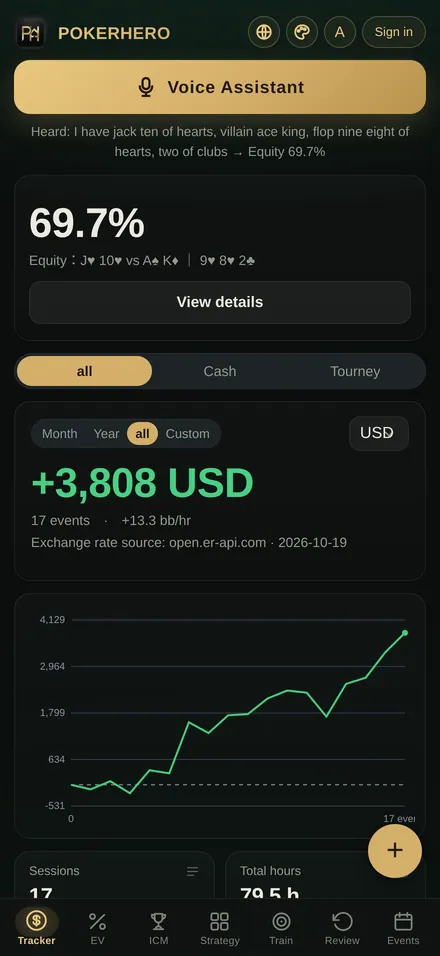
- Voice AssistantTap the voice button and say "cash game, bought in 10,000, cashed out 16,000". The result shows on screen first and is only logged when you confirm it. The microphone is only on while you use the voice button; audio is turned into text and then discarded, never stored.
Stats and graphs
What do the stats tell you once you log?
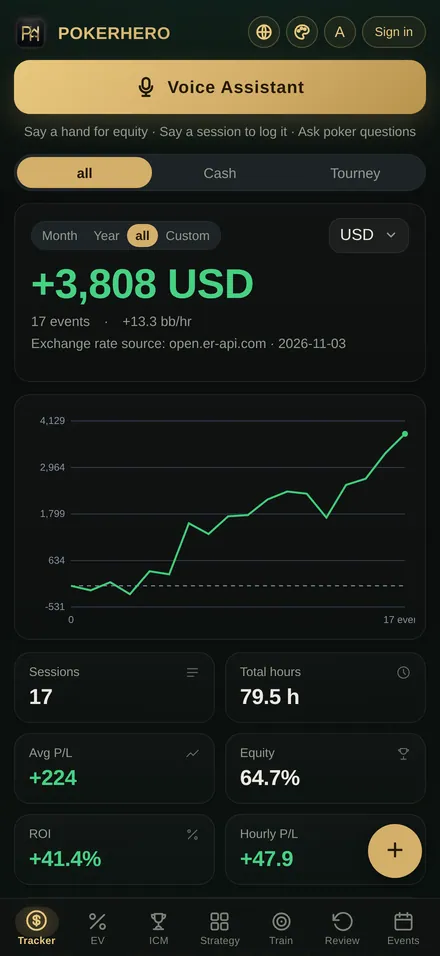
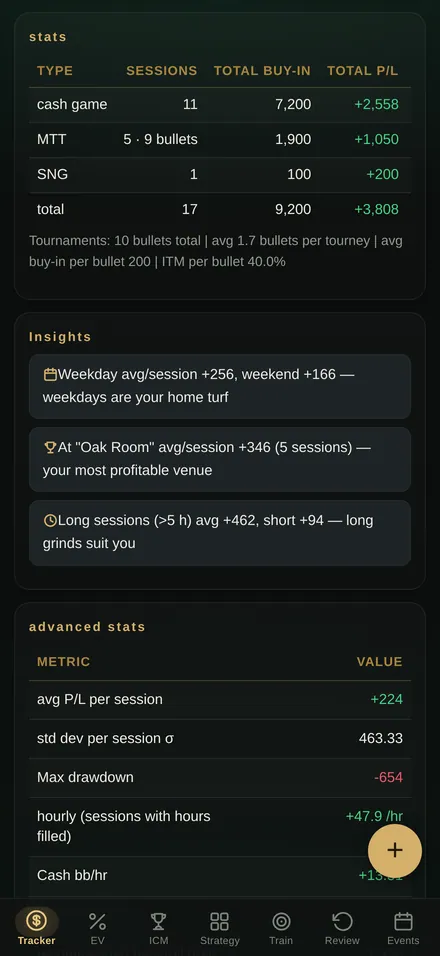
The top of the tracker shows total profit for the period you pick: month, year, all time or a custom range, for everything or only cash games or tournaments. Below that are sessions, total hours, average profit, win rate (share of winning sessions), ROI and hourly rate, followed by a stats table by game type.
- Sessions, total buy-in, total profit, ROI% and ITM% by game type
- Tournament bullets in total, average bullets per event and ITM per bullet
- Insights: weekdays vs. weekends, your most profitable venue, long vs. short sessions
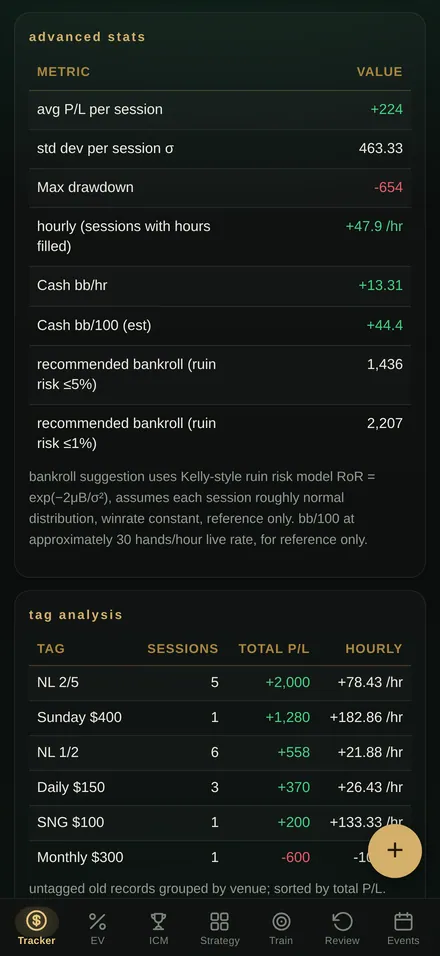
- Pro: profit graph, standard deviation per session, max drawdown and a suggested bankroll
- Pro: tag analysis, behavior analysis by session state, monthly report and tilt detection
For how ROI, hourly rate, bb/100 and the suggested bankroll are worked out step by step, with sample tables, see the 2 guides on how to track poker sessions and bankroll management. New to the game? Start with Wikipedia's Texas hold 'em article.
Sync and export
Will my records survive a new phone?
Yes, as long as cloud sync is on. POKERHERO lets you log without an account, and data stays on that device by default. When you switch phones or want several devices, sign in with Apple or Google and your records sync between the app and the web version.
One tracker on three platforms
Install it on iPhone, iPad and Apple Silicon Mac from the App Store, on Android phones from Google Play, or open the web version at pokerhero.cc on a computer. Sign in to the same account and your sessions, hand reviews, notes and session-state tags come along. You can delete your account and cloud data at any time from the account menu.
CSV export and JSON backup
The free version exports your sessions to CSV, which any spreadsheet can open. Pro adds a full JSON backup that also keeps hand reviews and notes, and can be imported again to restore. Before an import goes through, you see how many records it will add, and duplicates are skipped.
Get started
How do you log your first session in POKERHERO?
- Get the app or open the web appDownload free from the App Store for iPhone, iPad and Mac or from Google Play for Android, or open pokerhero.cc on a computer. No sign-up needed.
- Tap the + buttonOpen a new session from the tracker. The date defaults to today; pick the type first: cash game, timed table, MTT or SNG.
- Enter buy-in, cash-out and hoursFor cash games enter the total buy-in and big blind, for tournaments the buy-in per bullet and bullets, then cash-out and hours. Tap session states if you want to note your mood.
- Tap Add and check your statsBack on the tracker, total profit, ROI, hourly rate and ITM% are already updated. Log every session the same way and the numbers keep getting more reliable.
FAQ
Poker bankroll tracker FAQ
Is the poker bankroll tracker free?
The download is free, and the free version logs 10 sessions with basic stats, insights and CSV export. Upgrade to Pro for unlimited sessions, the profit graph and advanced stats. Pro is a one-time purchase, not a subscription: US$19.99 base price; prices vary by App Store or Google Play storefront.
Do I need an account to log sessions?
No. Open the app or the web version and start logging right away; your data stays on your device by default. Sign in with Apple or Google only when you want cloud sync, for example when you get a new phone or use several devices.
Which phones and platforms does it support?
iPhone, iPad and Apple Silicon Mac from the App Store (iOS 15 or later), Android phones from Google Play (Android 8.0 or later), and the web version at pokerhero.cc on a computer. One account works on all three.
Can I export my poker records?
Yes. The free version exports your sessions as a CSV file for your own spreadsheet analysis. Pro adds a full JSON backup that also keeps your hand reviews and notes, and you can import it again later to restore everything.
Is my data safe? Can anyone else see it?
Records stay on your device by default and are not synced to the cloud unless you sign in. With cloud sync on, records belong to your own account only, and you can delete the account and cloud data any time from the account menu. Voice Assistant audio is turned into text and discarded, never stored.
How is this different from a notebook or a spreadsheet?
With a notebook or spreadsheet you build the formulas yourself. POKERHERO works out profit, ROI, hourly rate and ITM per bullet the moment you save, and converts currencies for you. Logging is quicker too: paste one session per line or just say it. Old spreadsheet records can be imported once saved as CSV in the columns the app supports.
Can I look at live and online sessions separately?
Yes. Each session is marked live or online, and the session list filters by arena and by game type. The tracker can also show only cash games or only tournaments, for a month, a year, all time or a custom date range.
Can I play poker in POKERHERO?
No. POKERHERO is a record-keeping and strategy tool: there are no games to play and no money transactions in the app. The tracker only records your own buy-ins, cash-outs and hours for each session, so you can review them and plan your bankroll.
Tracking guides
Once the records are in, what do you do with the numbers?
These 2 guides explain the ideas behind tracking and bankroll management: what to log for each session, how profit and hourly rate are worked out, and how to use your own data to decide which stakes to play.
How to track poker sessions
Which fields to log for cash games and tournaments, how profit, hourly rate, ROI and ITM% are calculated, with a sample table and common mistakes.
Read the tracking guidePoker bankroll management basics
How many buy-ins to keep, when to move up or down, and how standard deviation and risk of ruin give you a suggested bankroll.
Read the bankroll guideFree download
Log tonight's session while you still remember it
POKERHERO is free to download for iPhone, iPad, Apple Silicon Mac and Android phones, and on a computer you can open the web version instead. No sign-up is needed: open it and log your first session right away.